AI Overviews are taking over. This is what we are being told on a regular basis. And Google AI Mode is just around the corner (or bounding around the corner if you are in the US!).
This means that people’s search habits could change drastically, shifting from simple, short searches to complex, in-depth ones.
The impact on marketing is massive, and while the biggest changes may be to SEO in the short term, changes are coming to PPC, too.
And while thousands of words have been written on the evolution of SEO, much less has been written on where PPC is headed.
So, today, we will focus on Google Ads and their future with AI Overviews.
What are AI Overviews?
AI Overviews started to appear for most users through 2024 and into 2025 as Google ran a phased rollout. Originally, they only appeared for a few searches, but over time, they started to appear on every search.
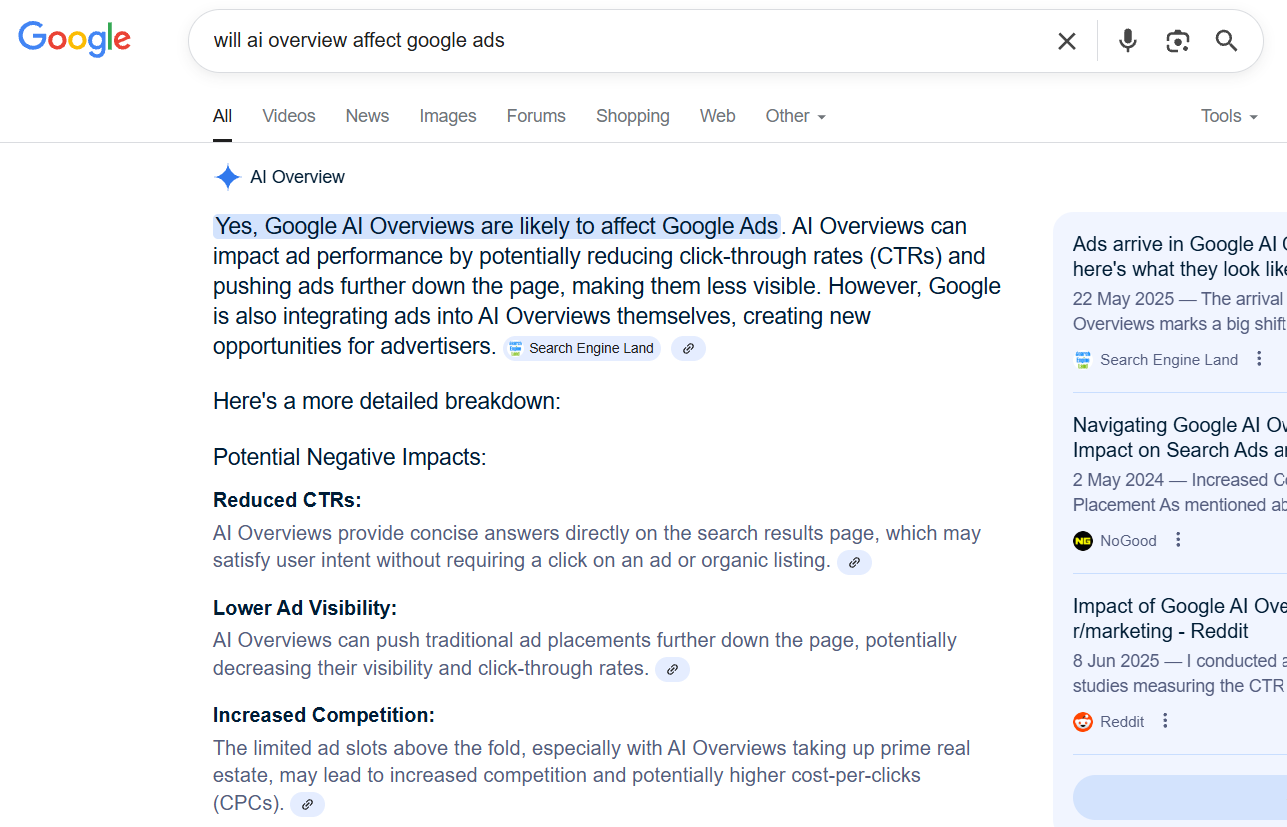
When they appear, they look something like this:

So, Google will quickly summarise the answer to your question, before breaking down the question in a little more detail. Google also helpfully offers links to all of its sources of information – this is where the impact on SEO could be seismic!
The exact layout will depend on your question, but this should give an idea of what to expect.
AI Overviews can appear alongside or below other search page features, such as Google Business Profiles or local map results.
Needless to say, they are here to stay!
Can Google Ads appear within AI Overviews?
As of August 2025, Ads will only appear within the AI Overview if you are in the US, and your device (desktop or mobile) is set to English.
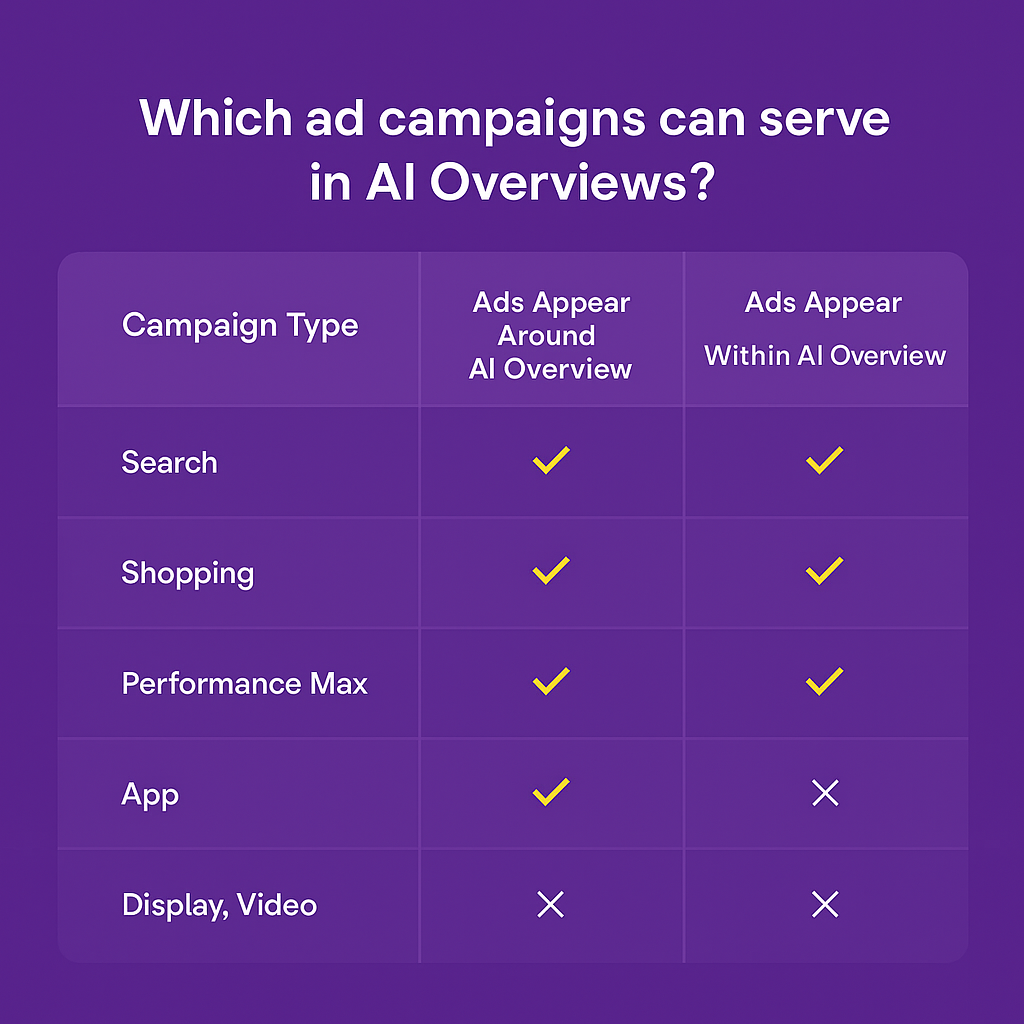
At the moment, only Text and Shopping Ads, from Search, Shopping and Performance Max campaigns, can appear here.
If you are outside of the US, Ads will only appear above or below the AI Overview. These include all the standard Ad Types you would expect to appear on a Google results page. This includes Text, Shopping, Local, or App ads. (Source – https://support.google.com/google-ads/answer/16297775?hl=en)
As support within AI Overviews is currently available in English, other English-speaking markets would likely be next in the rollout throughout 2025, though no exact dates have yet been announced.
What do Google Ads within AI Overviews look like?
If you are in the US (and other countries soon!), this is how Ads within AI Overviews may look:
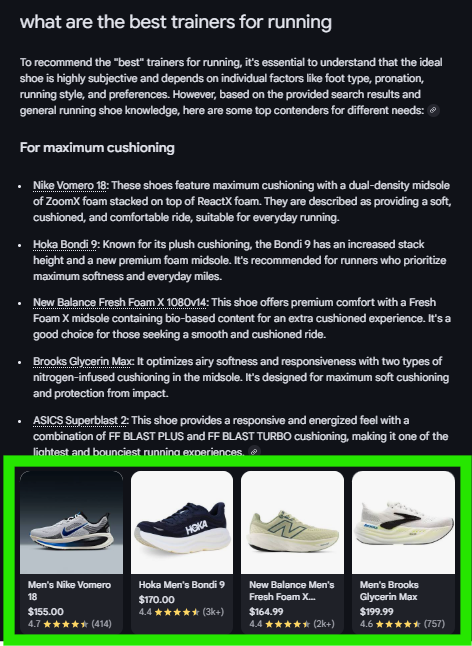
These are not technically sponsored results, but this is what to expect from Shopping results within AI Overviews. They will use the pre-existing shopping format, linking out to specific products at specific stores.
There are currently limited examples of Text ads in the AI Overview, but we will update this blog when we have some images. In general, they should appear as a standard Search Ad, with a headline and description.
If you are outside of the US, your Ads will appear as usual on the Google results page, either above or below the AI Overview.
How do you make Ads appear in AI Overviews?
As it stands, whether in the US or outside, there is no way to guarantee that your ads will appear within AI Overviews. You cannot target ads to only appear in AI Overviews, and there is also no way to opt-out of appearing within them.
Once appearing in AI Overviews is available in your country, you can use one of the following campaign types to give yourself an opportunity to appear:
If you want your Search Ads to appear within AI Overviews, you must be using one of Google’s AI-powered or keywordless targeting options. These include:
- Broad match with smart bidding
- AI Max
- Performance Max
- Dynamic Search Ads
These are areas that Google is likely to push further over the coming months and years as it moves towards intent and signal-based Search ads and away from Keyword-based solutions.
For Shopping ads, you will need to ensure that you maintain a high-quality shopping feed, meeting all current best practices. This includes keeping the feed up to date, updating essential product fields such as title and description, and so on.
Can you report on Ads within AI Overviews?
As it stands, there is no way to report on whether you are appearing in AI Overviews or not. This is a feature that Google has decided not to release. Hopefully this will change in the future.
In line with other AI-powered tools available within Google Ads, Google would like you to put your trust in its AI, so it has kept this data within its ‘black box’.
This may change, as we have seen recently with Channel Reporting now available in Performance Max – though it took Google nearly four years to add this feature to PMax.
There is also positive news in that other platforms seem to be able to access some of this AI data – see Wix enabling AI visibility within its platform (for SEO purposes), https://www.searchenginejournal.com/wix-announces-ai-visibility-overview-citation-sentiment-tracking-tool/551335/.
How to prepare your Google Ads for AI Overview
With the launch of AI Max to most advertisers in July 2025 and AI Mode being open to US users for the past few months, Google is rapidly accelerating its movement toward an AI-powered future.
It is still early days, though, for PPC and AI Overviews. Google has already started rolling ads within AI Overviews in the US (as of August 2025), and we expect this to go live in other English-speaking markets later in 2025.
The impact on PPC is yet to be seen.
Google would suggest that it is a good thing, and ad performance will only improve. But based on the experiences of some within the SEO sphere, it is worth taking this with a pinch of salt for now. All we can do is prepare.
So, to finish, here is a checklist to prepare your Google Ads for the coming AI Overview evolution:
- Ensure you have robust tracking set up – ideally utilising first-party data (such as uploading leads directly from your CRM to Google Ads)
- If you aren’t using AI-powered tools within Google Ads, start to experiment with them now – this includes Performance Max, Smart Bidding, AI Max
- If you aren’t using Broad Match, start to test this – Google will want flexibility to be able to fully align your ads with user intent
- Ensure your landing pages are refined and optimised for the users you hope to capture – Google may use these to help drive its ad choices (it wants your landing page to be helpful to the user)
- Review ad copy and update in line with how AI Overviews answer user questions and intent
- If you want to focus on Shopping, ensure your shopping feed matches current best practice, i.e. optimised titles, descriptions, GTINs
- Ensure you upload high-quality assets
- Optimise your audience signals – this may also require ensuring you upload first-party customer match lists from your CRM